
Already studying
Open the Unit that addresses a topic you found confusing in your course or question bank. Check the question and decision process. You can leave the beginner introduction closed and go straight to the lesson.
HOW TO USE
TWO WAYS TO START
Open the Unit that addresses a topic you found confusing in your course or question bank. Check the question and decision process. You can leave the beginner introduction closed and go straight to the lesson.
Open the beginner introduction at the start of a Unit to see its purpose and main idea. For an overview of a subject, begin with its introductory Unit.
You can use this site without having purchased another course. However, it is not designed to provide complete exam preparation on its own.
Even if U.S. institutions or English technical terms are unfamiliar, you can start with everyday examples. Open the term definitions whenever you need them.
CPA EXAM STRUCTURE
The CPA Exam has three required Core sections and a choice of one of three Discipline sections. BAR is not a fourth section that every candidate must take.
Manga Ledger covers AUD, FAR, REG and BAR. ISC and TCP are not currently included. Check the exam administrator's latest guidance when planning your exams.Check the current exam structure
ONE UNIT
Start with the explanation and manga, then describe in one sentence what you need to decide.
↓Identify the conditions that determine the answer and follow a worked example. Open definitions for unfamiliar terms or revisit a prerequisite Unit when needed.
↓Each Mini Case changes the facts. Think through your answer and reasoning before choosing. If you are unsure, revisit the explanation of the facts that determine the answer.
↓Record separately what you have read, what you can answer and what you want to review. Units with several comparisons are divided into smaller lessons.
LEARN FROM A TERM
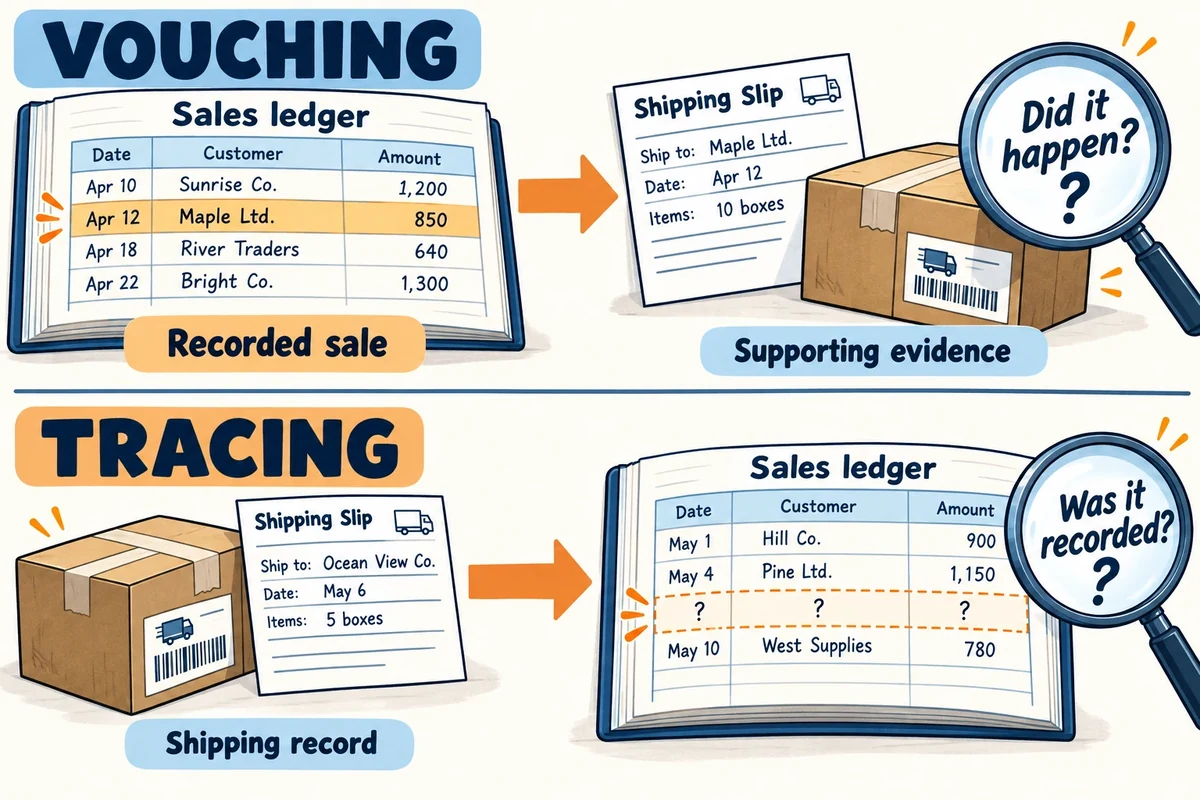
See how Vouching and Tracing differ: start with recorded sales and check the evidence, or start with shipping records and follow them into the ledger. Use illustrations, short explanations and comparisons to connect unfamiliar terms to related Units.
Currently 110 terms across AUD, FAR, REG and BAR. Free members can read entries linked to the selected free Units; paid members can access all 110 terms.
After logging in, open Visual Dictionary from the menu. Search by an English or Japanese term or an abbreviation, and filter by subject. For example, search “DTA” for Deferred Tax Asset.
Read the meaning, explore the illustration and check the common mix-up, then follow a link to a related Unit. Open the dictionary from “Look up a term” or “Terms in this scene” within a lesson, and select “Back” to keep your place and inputs. Enlarge illustrations on your phone when you need a closer look.
Select “Save for review” to save a term to your account. Your member home shows up to three saved terms. Try to recall the picture and meaning before revealing the answer, then record how you did. Use My Notes when you want to write your own explanation.
FOUR SUBJECTS, FOUR APPROACHES
When you get stuck, use the subject's process to find your place. Return to what you need to decide and the facts that determine the answer, then work out what to check next.
Audit stage → Risk and assertion → Procedure → Evidence → Report
Required answer → First decision → Exceptions → Accounting treatment → Financial statements
Tax: taxpayer → transaction → basis → return. Law: parties → rights → priority → remedies.
Analysis: objective → action. Advanced accounting: facts → reporting. Government: funds → government-wide statements.
HOW TO RETURN
The aim is not to work through this site over and over. Use it as a map for deeper learning in your main course.
Focus on the topic's purpose, decision points and connections to other concepts, rather than trying to memorize every condition or amount.
Use comprehensive exam-preparation materials to learn the standards, exceptions and calculations, and to practice questions.
If you wonder where a topic fits or why a treatment applies, revisit that Unit's manga, map and decision process, then return to your main course.
Returning is not starting over. It helps you put the details back in the right place within the bigger picture.
PROGRESS
“Read” means you have worked through the content. After answering every Mini Case and checking that you can explain what is being assessed, the key facts and the rule in your own words, you can mark the Unit as “Practiced”. Written reasoning is not graded automatically. Neither status certifies mastery.
When logged in, your Unit progress, practice answers and reasoning notes are saved to your account. Worksheets also let you revisit your entries and recent attempts. Your entries are not saved during a guest session. Create a free account and verify your email to save your progress.
Mark a Unit for review when you want to revisit it. Your member home page includes short review cases and saved illustrations. Search for a term to find the relevant section, and return to your original Unit after reviewing a prerequisite.
Set an exam date and mark the exam sections you have passed in the progress area on your member home page. Exam dates are optional; a countdown appears only after you set one. You can change or remove these details later.
MY NOTES
My Notes is a place to build your understanding, from exam study to professional practice. Use it when it helps; you can also keep studying Units without taking notes.
Record what you learned, a question from work, the sources you checked and your understanding. Link a relevant Unit so you can return to the learning behind your note.
Edit your notes as your understanding deepens. Add insights and the conditions behind a decision. After passing all four exams, keep building knowledge you can revisit at work.
Practice examples help you picture where a Unit applies at work. Beginners can start with an example that interests them. Notice how industry, company size and transaction context can affect a decision.
Organize your note as: question → context → ASC references checked → conclusion and reasoning → your understanding. Link a Unit to connect a practical question with the underlying concepts. Do not include actual contracts or confidential information; record source references and your own explanation instead of copying the standard.
We plan to let members share insights they have permission to disclose and build a collection of practical knowledge linked to Units. One person’s experience can help another work through a question or picture a situation at work. Our goal is a place to keep learning and contributing after the exams. Sharing between users and review features are not available yet.
Your personal notes are never published automatically. Create a separate draft containing only insights you have permission to share. For now, these drafts are saved in your member account and are not sent to other users.
Notes are saved to your member account. If a save fails, follow the on-screen instructions to retry. Free members can also use My Notes. Entries in “Practice” are fictional, unreviewed examples. Check the context and sources before applying an example to an accounting decision.
Use My Notes with a free accountREADY TO LEARN?